
By TrackScore · 6 min read · Last updated: March 2026
→ Set up your rep leaderboard free in 5 minutes trackscore.online
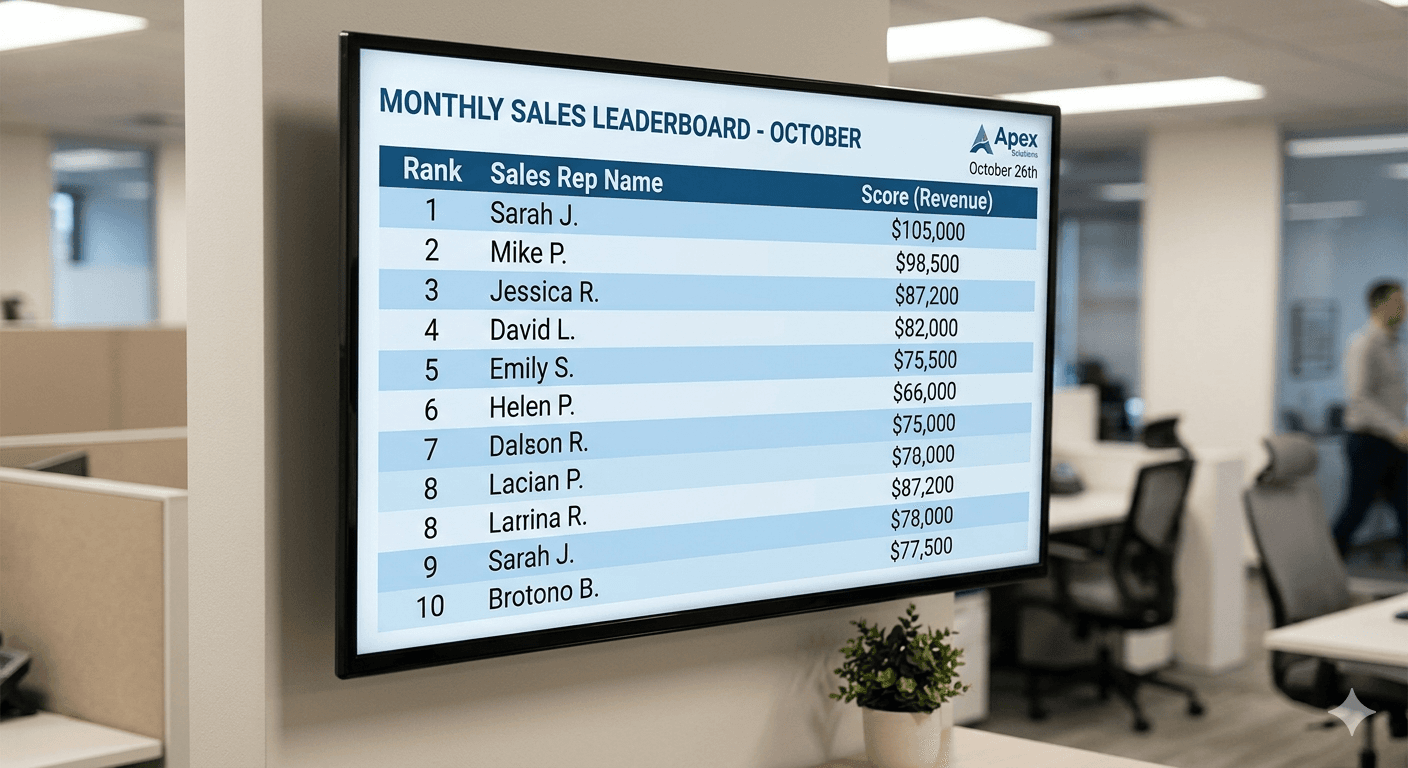
There's a difference between a sales leaderboard and a sales rep leaderboard. The first tracks your team. The second tracks each individual by name, by rank, by score on a screen the whole office can see. That difference matters. This guide covers exactly how to set up the individual rep version on any TV or screen you have available.
Putting individual rep performance on a TV is one of the most effective sales management tools available, and one of the most commonly misconfigured. Done right, it's a daily motivational engine. Done wrong, it creates anxiety, resentment, and a team that stops trusting leadership.
This guide covers the full setup hardware, software, metric selection, display configuration, and the people management side that most technical guides skip entirely.
Rep leaderboard vs. team leaderboard: what's the difference?
Before diving into setup, it's worth clarifying the distinction because the configuration decisions flow directly from which type you're building.
| Rep Leaderboard | Team Leaderboard | |
|---|---|---|
| What it shows | Individual rep names + their rank, score, trend | Team totals, aggregate goals, department vs department |
| Primary use | Accountability + individual motivation | Company-wide visibility, exec dashboards |
| Best audience | The sales team itself | Leadership, all-hands, office-wide screens |
| Update frequency | Daily or real-time | Weekly or monthly |
| Risk if mishandled | Can embarrass bottom performers | Lower stakes no individual called out |
| TrackScore support | ✓ Full support participant-level scores | ✓ Full support board-level metrics |
Most sales floors benefit from both: a rep leaderboard that keeps individual accountability front and center, and a team or company-wide board for all-hands moments or executive visibility. This guide focuses on the rep-level display the one that names names and shows exactly where each person stands.
Related: If you're setting up a general team leaderboard display rather than individual rep rankings, see our guide: How to Display a Real-Time Sales Leaderboard on Your Office TV.
Why individual rep visibility changes behavior
The mechanism is straightforward: when people know their performance is visible not just to their manager in a one-on-one, but to the whole team in real time they behave differently. Not because of fear, but because of identity.
Sales reps are competitive by nature. Most of them don't want to be at the bottom of a public ranking. That social pressure, applied consistently and fairly, produces more consistent effort than most coaching interventions.
The key word is fairly. A rep leaderboard that ignores territory differences, deal size, or tenure will breed resentment rather than motivation. The setup decisions below are where fairness gets built in or doesn't.
What the data shows: Sales teams using visible individual performance displays consistently report that top performers work harder to maintain their position, and mid-tier performers are more motivated by seeing a clear gap to close than by any other feedback mechanism. The board does the coaching work passively.
Step 1: Choose the right metric for your rep display
The single most important decision in your setup is what you put on the board. This is where most sales managers go wrong they either show too many metrics (reps don't know what to optimize for) or the wrong one (creates perverse incentives).
Here's a reference guide for the most common rep-level metrics:
| Metric | Best for | Why it works | Watch out for |
|---|---|---|---|
| Deals closed | Short-cycle sales, retail, SDR teams | Motivating reps can see daily wins | Doesn't show deal size |
| Revenue generated | AE teams, enterprise, commission-based | Directly tied to money highly motivating | Discourages small-deal activity |
| Calls / outbound | SDR, BDR, call center teams | High volume board moves a lot | Can incentivize quantity over quality |
| Demos booked | SaaS, B2B sales with discovery step | Clear leading indicator of pipeline | Lags slightly behind activity |
| % to quota | Any team with individual quotas | Fair comparison across different territories | Requires quota data to be current |
| Points (composite) | Teams wanting to reward multiple behaviors | Flexible reward what matters most | Requires score configuration upfront |
For most teams, the right answer is one primary metric that directly ties to revenue, plus optionally one leading indicator. More than two metrics and the board loses its motivational clarity.
Pro tip: If your reps have unequal territories or different-sized accounts, use % to quota rather than raw numbers. A rep closing 3 enterprise deals against a quota of 4 is performing better than a rep closing 8 SMB deals against a quota of 15 the board should reflect that.
Step 2: Choose your display hardware
Any screen with internet access can run a rep leaderboard. Here's how the main options compare:
| Device | How it works | Best for | Cost | Ease |
|---|---|---|---|---|
| Chromecast (Google) | Cast browser tab from Chrome | Simple, uses existing laptop/phone | ~$30 | ★★★★★ |
| Amazon Fire TV Stick | Silk browser or Android cast | Cheap, good if no Chrome ecosystem | ~$35 | ★★★★☆ |
| Apple TV | AirPlay from Mac or iPhone | Seamless for Apple shops | ~$130 | ★★★★☆ |
| Laptop via HDMI | Direct cable, fullscreen browser | Zero extra hardware if you have a spare | Free | ★★★★☆ |
| Mini PC (dedicated) | Plug in, run browser in kiosk | Best for permanent always-on display | ~$100–200 | ★★★★★ |
| Smart TV browser | Open URL directly on TV | No extra device needed | Free | ★★★☆☆ |
For a first deployment, Chromecast is the fastest path from zero to live. For a permanent, always-on installation, a dedicated mini PC running a browser in kiosk mode is worth the extra hour of setup it eliminates the dependency on a laptop being left open and casting.
Screen placement matters more than screen size
A 40" TV in the right spot outperforms an 80" TV in the wrong one. The ideal placement is:
- Visible from the main sales floor without reps having to turn around
- Near a natural gathering point entrance, kitchen, printer area
- At eye level or just above screens mounted too high get ignored
- Not directly behind anyone's desk, which creates a blind spot for the person it's aimed at most
Step 3: Set up your rep leaderboard in TrackScore
TrackScore is designed for exactly this use case: per-rep scoring, public display links that work without a login, and real-time updates you can push from a phone. Here's the full setup walkthrough.
Create the board
- Go to trackscore.online and sign up for a free account.
- Click 'Leaderboard' → 'Create Leaderboard' .
- Name it something your team will recognize: 'Q2 Rep Rankings', 'March Sprint', or whatever fits your cadence.
- Under Scoring, add your chosen metric. If you want two metrics, add both TrackScore supports composite scoring.
Add your reps
- Click 'Add Participant' and enter each rep's name.
- Add all active reps including newer ones. Leaving someone off the board signals they're not being held to the same standard, which creates its own problems.
- Optional: add a profile photo for each rep. Boards with photos drive noticeably higher engagement faces make the competition feel personal.
Configure the display
- In Settings, choose your ranking direction (highest score first for most metrics; you can flip it for metrics where lower is better).
- Set your score period whether the board tracks all-time scores or resets on a schedule (weekly, monthly). For most teams, monthly resets work best.
- Enable 'Self-update links' if you want reps to log their own scores. Each rep gets a unique URL that lets them submit scores directly without accessing the full board.
Get the TV display link
- Click 'Share' → 'Public Display Link'. This generates a clean, full-screen URL with no editing controls.
- Test it in a browser tab. It should show names, scores, and rankings in large, readable text designed to be legible from across a room.
- This link stays live permanently. Bookmark it on whatever device you're using to cast.
Important: The public display link is view-only nobody can edit scores or access board settings from it. It's safe to leave up on a shared screen without any login.
Step 4: Get it on the TV
The fastest method: Chromecast + Google Chrome. Here's the exact sequence.
Using Chromecast (recommended)
- Plug the Chromecast into your TV's HDMI port and connect it to your office Wi-Fi via the Google Home app.
- On any laptop connected to the same Wi-Fi network, open the display link in Google Chrome.
- Click the three-dot menu (top right) → 'Cast...' → select your Chromecast device → choose 'Cast tab'.
- The leaderboard appears on the TV. On the casting laptop, press F11 to go full screen, then close the lid or set the screen timeout to 'Never'.
- The board stays live on the TV as long as the laptop is awake and on the same network.
For a permanent always-on display
If you want the board to run 24/7 without depending on a laptop:
- Plug a mini PC or NUC into the TV's HDMI port
- Connect to office Wi-Fi and open the display link in Chrome
- Set Chrome to launch full screen on startup (use a Chrome extension like 'Kiosk' or set via command-line flag
--kiosk) - Disable screen timeout in Windows/macOS power settings
- The board now runs independently no laptop required, updates whenever scores are entered from any device
Using Apple TV
- Make sure your Mac or iPhone is on the same Wi-Fi network as the Apple TV.
- Open the display link in Safari or Chrome on your Mac.
- Click the AirPlay icon in the menu bar (or Control Center on macOS) and select your Apple TV.
- On the Apple TV, the tab appears. For fullscreen, use the Mac keyboard shortcut Ctrl+Cmd+F.
Using a Fire TV Stick
- Plug the Fire Stick into HDMI, connect to Wi-Fi.
- Open the Silk browser from the Fire TV home screen.
- Navigate to your display link URL. Silk will render the leaderboard in the browser.
- For fullscreen, use the Silk browser fullscreen button or press the menu key.
Step 5: Managing the people side how to introduce it to your team
The setup is the easy part. The harder part is introducing a public rep leaderboard to a team that isn't expecting it. Get this wrong and you'll spend weeks undoing the damage. Get it right and the board does more coaching work than any 1:1 could.
Announce it before you launch it
Don't just show up with a TV and a leaderboard. Tell the team what you're doing, why you're doing it, and how scores will be calculated at least a week in advance. Surprises about public performance measurement create anxiety and erode trust.
Be explicit about what you're measuring and why
'We're tracking deals closed because that's the activity that most directly correlates to team revenue, and I want everyone to be able to see where they stand relative to their own goal, not just their manager.' That's a much better launch than 'I put a leaderboard on the TV.'
Address the fairness question head-on
If you have reps on different territories, accounts, or product lines, acknowledge it. Either adjust the metric (% to quota handles most fairness concerns automatically) or run separate competitions by segment. A rep covering 50 accounts shouldn't be ranked against a rep covering 5.
What to say at launch: "This board is here to give everyone real-time visibility into where they stand not to put anyone on the spot. The goal is that you never walk into a 1:1 surprised by your numbers, because you can see them any time you look up. If the metric ever feels unfair, tell me and we'll fix it."
Run a soft launch first
Put the board up for two weeks without making a big deal of it. Let reps notice it organically. By the time you formally announce it, they'll already be checking it and the conversation shifts from 'why are we doing this' to 'how do I move up'.
Keeping the board effective over time
A rep leaderboard has a half-life. The motivational effect is strongest in the first few weeks and decays unless you actively maintain it. Here's what prevents decay:
Reset the board on a rhythm
Monthly resets are the sweet spot for most sales teams. They're short enough that a strong week can change your position significantly, long enough that results reflect genuine effort rather than luck. Quarterly resets work for longer-cycle sales. Weekly resets work for high-volume SDR teams. Never-resetting boards eventually get dominated by a couple of top performers and stop motivating the middle.
Acknowledge the board publicly
The display only works if leadership references it. Mention the top performers by name in team standups. Acknowledge when someone climbs ranks. Call out streaks. The board is a conversation starter, not a replacement for conversation.
Update it consistently
A board with stale scores is worse than no board. It signals that leadership doesn't care enough to maintain it, which signals the whole initiative isn't serious. If manual updates feel like a chore, enable self-update links so reps log their own scores it takes the admin burden off you entirely.
Tip: Schedule a 2-minute recurring task at the end of each day to update scores. After a week it becomes automatic. Alternatively, set up self-update links and let reps own their own numbers many managers find this actually increases accountability because reps are forced to confront their score at logging time.
Evolve the metric over time
The metric that motivates in Q1 might not be the right one in Q3. If you're hitting quota consistently, shift the primary metric to a leading indicator to keep growth going. If pipeline is weak, make demos booked the main board. The leaderboard should reflect what the team needs to focus on right now not what it needed six months ago.
Frequently asked questions
Can reps opt out of being on the leaderboard?
Technically yes you could exclude someone from the board. In practice, making the board optional undermines the whole point. A better approach: give reps agency over their display name (some prefer initials or a nickname), and ensure the metric is fair before you go live. Most opt-out requests come from reps who feel the measurement is unfair fix the metric, not the participation.
What happens to a rep who is always last?
This is the most important question in rep leaderboard management. If someone is consistently last and nothing else changes, the board is doing harm. The board should prompt a conversation not replace one. Use the ranking as a coaching trigger, not a punishment. If someone is consistently last despite genuine effort, that's a territory, resource, or skills conversation not a leaderboard problem.
Does the board need to be on 24/7?
No, but consistency matters more than hours. A board that's reliably on during work hours is better than one that's sometimes on 24/7 and sometimes dark. If your office has variable occupancy, consider a smart plug on a schedule the board comes on at 8am and off at 7pm automatically.
Can I show multiple boards on one screen?
TrackScore supports separate boards for separate competitions, and you can rotate between display links using a simple browser tab-switching extension (like Tab Rotate for Chrome). This works well for teams running both a monthly individual ranking and a weekly sprint competition simultaneously.
What if our internet goes down?
The display link will show whatever was last loaded until the page times out or is refreshed. For critical always-on displays, a 4G backup router is a reliable failsafe. Most offices find a brief outage isn't worth the extra infrastructure though.
Can we display the board on multiple screens in different parts of the office?
Yes. The public display link works in any browser, on any screen, simultaneously. You can have the same board live on three TVs across different floors with no additional configuration each one just opens the same URL.
The bottom line
A sales rep leaderboard TV display is one of the most reliable performance tools in sales management but it only works if the setup is thoughtful. The hardware takes an afternoon. The metric decision takes fifteen minutes of serious thought. The people management side takes a conversation.
Get all three right and you end up with something that does passive coaching work every day: it keeps your top performers hungry, gives your middle performers a target, and gives you a conversation starter with anyone who needs one.
The worst outcome is a board that goes live with fanfare and dies quietly three weeks later because nobody updates it. Build the update habit before you build the display then launch.
Ready to set up your rep leaderboard?
TrackScore is free to start. Add your reps, enter your first scores, and have a live TV display running in under 30 minutes.
→ Build your free sales team leaderboard → trackscore.online/sales-team-leaderboard